Find your friends. Keep skiing.

See your group on the piste map, pick a place to meet and hear the way there.

Join the beta waitlist

Not in the App Store or Google Play yet. The free beta is for Android and iPhone: join the waitlist and we’ll email you an invite.

Glove scene: AI-generated illustration.

For ski days with friends

Six friends, three speeds. By the second lift one of you has taken the easier run, one is still in the queue and lunch is “somewhere near the top station”. FriSki puts the whole group on one piste map and gives you one place to meet.

Stay together across the mountain.

See your friends on the piste map and choose a meeting point for the group. Each person sees their own distance, and an ETA wherever a mapped route reaches the point.

Native FriSki Android map of a five-person demo group, with fictional profile photos on piste markers. Tom Rivera is selected: on run La Louve, about 23 minutes and one lift away, with Navigate and Chat. Names and locations are demo examples.
Find a friend on the mapTom is on La Louve, about 23 minutes away. Only friends who share their position appear.
FriSki Meet asks to set Tête de Balme as a meeting point. A mapped-run notice appears above example ETAs for Maya, Tom, Lena and You; Niko is not on a mapped run. Share meeting point is available.
Choose where to meetSet one point for lunch or a regroup. Each friend sees their own ETA, or that no mapped route reaches it yet.

Galaxy S21 beta captures with a fictional demo group, generated profile photos and simulated positions. Names and numbers are examples. Downloaded maps work offline. Friends’ live positions need mobile signal.

How it works

One ski day, first lift to last run.

Set it up once the evening before. On the mountain the phone can stay in your pocket.

  1. Make a group

    One of you creates it. Friends join with a QR code, the group code or a share link. Groups are invite-only.

  2. Download the resort

    Save your resort’s map on Wi-Fi before you travel, about 1 to 3 MB. Then it draws with no signal.

  3. Start the ski day

    Tap Start ski day on your group’s lift ticket. The app opens straight to the live map, and a ski day card keeps the next turn and your group in your notifications.

  4. Find a friend

    Everyone who shares their position is on the piste map, on a run or a lift, with how fresh that position is.

  5. Pick where to meet

    A lift, a hut, a run or where you stand. Everyone gets the same point and their own way there.

  6. Ski there, phone away

    Spoken directions and friend alerts in your headphones. The next turn on your lock screen or watch.

  7. Regroup

    The meeting board shows who is already there and who is still on the way.

  8. Look back, tell us

    Your day summary keeps distance, vertical and runs, and you choose whether to share it. Then rate the day in the app.

Before your first ski day

  • Download your resort on Wi-Fi.
  • Allow location all the time (iPhone: Always), so directions, alerts and the lock screen card keep working with the phone in your pocket.
  • Play the test alert in Settings to check your headphones.
  • Garmin owners in the beta: install the watch app we send you.
  • Ski the run you can see. FriSki is a helper, not a safety device.

In your ears

Hear the way. Keep your eyes on the snow.

With headphones in, FriSki says what you would otherwise stop to check. At a fork, that is one less glove off.

Hear the app’s test alert: “Friend nearby. Audio alerts are ready.” A recording of the Settings test alert, not a live cue.
  • A friend is close

    “Maya is nearby, about 150 meters ahead.”

    You choose the distance: 100, 200 or 500 metres.

  • Off the route

    “Wrong fork. New route.”

    Spoken when you take the wrong fork, as the new route is worked out.

  • At the point

    “You have reached the meeting point.”

    And when everyone is in: “The whole group has made it!”

  • Weak GPS

    “GPS weak. Directions are approximate.”

    The app says when it is less sure, instead of guessing.

Spoken directions are in beta and have not been tested on snow yet. Ski the run you can see, not the one the phone describes.

Phone and watch

Glance, don’t dig.

Gloves on, phone zipped away. FriSki puts the next turn, the meeting point and your group where a glance reaches them: your notifications and lock screen, the Dynamic Island and your watch. The phone does the work; these show it.

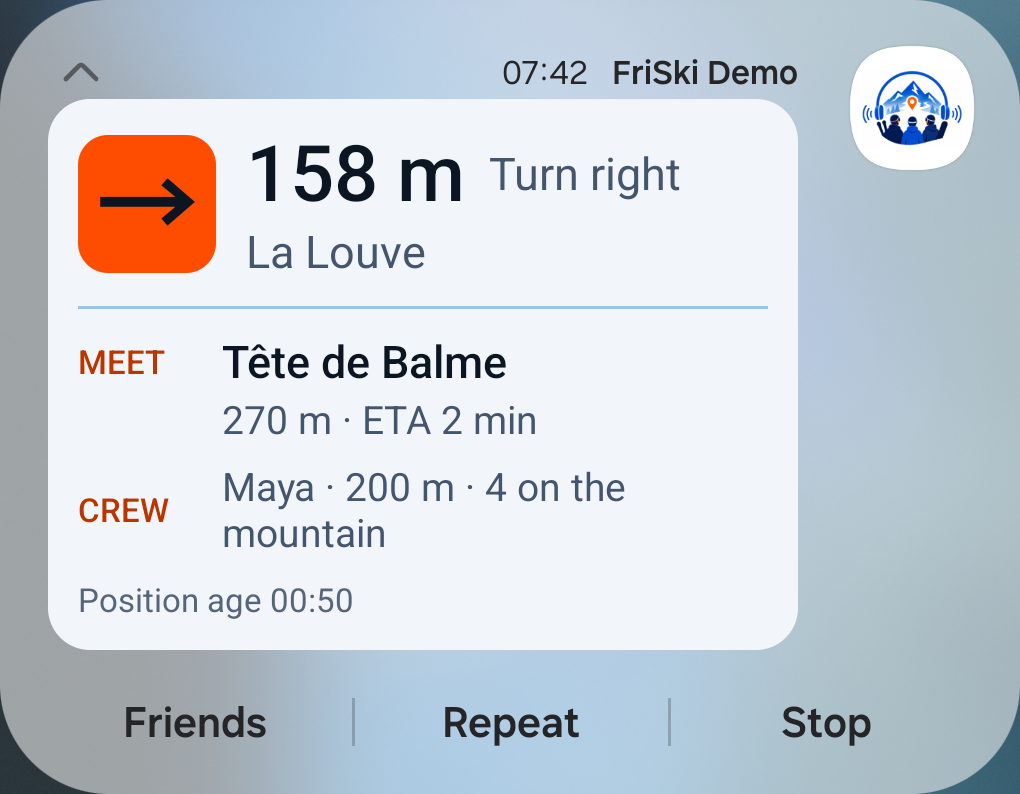
See the earlier light design, captured on a Galaxy S21 The earlier light design of the Android notification, captured on a Galaxy S21 before the card went dark: turn right in 158 metres onto La Louve, meet at Tête de Balme, Maya 200 metres away, with its Friends, Repeat and Stop buttons. Demo values.
Android beta

The ski day notification

Drawn from the app’s notification layout with demo values: the new dark card, the same on Android and iPhone. The earlier light design was captured on a Galaxy S21; the dark one has not been captured on a phone yet.

What you see

  • The next turn, how far it is and the run name
  • The meeting point, your distance and an ETA when a route measured one
  • Your nearest friend and how many of the group are on the mountain
  • How old your position is, so an old fix never looks live

What you can do

  • Say again and Who’s where answer out loud without opening the app
  • Stop opens FriSki and ends navigation. If you were heading to the meeting point, it ends that point for the whole group

The card is a silent notification. It shows on the lock screen only if your lock screen settings show silent notifications and their content.

Coming in the iPhone beta

Live Activity and Dynamic Island

Drawn from the app’s Live Activity code with demo values: the same dark card as Android. It has not run on an iPhone yet: the first iPhone beta build is its first test.

What you see

  • One ski day card that switches between your group, a meetup, navigation and arrival
  • The next turn and distance in the Dynamic Island, with more when you press it
  • PAUSED and “No signal for 3 min” when your position is old

What you can do

  • Stop, Say again and I’m here open FriSki to act. Stop works as on Android
  • Tap the card to jump to the group map

Needs iOS 16.2 or later. The Dynamic Island needs an iPhone that has one.

  • Garmin navigation: turn left in 180 metres, via Chamois, 4 minutes, 1 of 4 there, a red run; the ring shows progress and friends as dots.
    The next turnfēnix 8 · AMOLED
  • Garmin watch face: group Powder Day, 450 metres to Le Chalet, 1 of 4 there.
    Between runs
  • Garmin quick messages for the group: I’m here, On my way and Wait for me, START to send.
    A quick message

Real runs of the FriSki watch app in Garmin’s Connect IQ simulator, with demo data. Not photos of a watch, and not yet verified with a phone on the mountain.

Early preview for beta testers Garmin

Garmin watch app

Captured from the watch app running in Garmin’s simulator, with demo data. Not yet verified on a watch.

What you see

  • One ring for progress, direction and where your friends are
  • The next turn and its distance, then how many of the group are there
  • Messages from the group as they arrive

What you can do

  • Pick who, then a quick message
  • Need help sends only after you hold START for two seconds
  • Different buzzes for turn ahead, turn now and arrival

Needs your phone nearby with FriSki and Garmin Connect. No maps or GPS on the watch. Not yet tested with an iPhone. Testers install it from a file we send; it is not in the Connect IQ Store yet.

12 supported Garmin models

Epix Pro (Gen 2) 47 mm · Venu 3 · fenix 7 · fenix 7S · fenix 8 47 mm · fenix 8 Solar 51 mm · fenix 5 Plus · Forerunner 970 · Venu X1 · Instinct 3 AMOLED 50 mm · vívoactive 6 · Enduro 3

These are the models the watch app is built for. None has been tested with a phone on the mountain yet.

In development Apple Watch

Apple Watch app

Drawn from the watchOS app’s code with demo values. Not in a beta build yet.

What you see

  • Where you are heading, how far and how long
  • The next cue when there is a route
  • Your group, the meeting point and the latest message

What you can do

  • Quick messages to the whole group or one friend
  • Need help sends only after a two-second hold
  • Stop navigation from the wrist

Needs your iPhone nearby. No maps or GPS on the watch.

Every lock screen and watch state

No signal

When the signal drops.

Keeps working

The resort map you downloaded, your GPS position and the route you are on.

Waits for signal

Friends’ live positions, chat and changes to the meeting point. They catch up when coverage returns.

Says how old it is

A friend’s last position shows when it was seen. When your own GPS fix gets old, the ski day card says so instead of guessing.

Download each resort on Wi-Fi before you travel. FriSki also fetches it when you create or join a group there with signal; a resort that was never downloaded has no map to show offline.

App tour · 1:36

One ski day, start to finish

Follow a demo group from the first lift ticket to the day summary. Jump to the part you want to see.

Recorded on a Galaxy S21 in the Android beta, with a demo group and simulated positions. Spoken directions are in beta.

Read the walkthrough
  1. 0:00 · Introduction

    How FriSki works. Android beta demo. Example people and values; route uses simulated positions.

  2. 0:04 · Home

    From the group’s lift ticket, start the ski day and open the map.

  3. 0:09 · Join

    A friend can scan a QR code or enter the group code. No code is entered in this recording.

  4. 0:15 · Tabs

    Switch from Home to Chat with the tabs below the screen.

  5. 0:21 · Chat

    Tap On my way below the group thread. Your reply appears in the conversation with its delivery status.

  6. 0:31 · Meeting point

    Tête de Balme is on a mapped run. The app lists example ETAs for the group; Niko is not on a mapped run.

  7. 0:38 · Share point

    Tap Share meeting point. The meeting board opens with other members marked as not sharing.

  8. 0:43 · Choose route

    Compare Fastest and Easiest. The recording selects Easiest: a blue route, 278 metres and about two minutes.

  9. 0:48 · Start navigation

    Tap Start. The beta app notes that current operating status is unknown.

  10. 0:54 · Follow the turn

    Follow the turn onto the blue run toward the meeting point. This demo uses simulated positions.

  11. 0:58 · Arrival

    Check the meeting board: You are marked arrived while four group members remain out. FriSki voice: You have reached the meeting point.

  12. 1:01 · Members

    Check each friend’s status and distance in the member list.

  13. 1:10 · Settings

    Turn on Ghost mode to hide your exact position. Open Audio output, choose where voice cues play, and tap Play test alert. FriSki voice: Friend nearby. Audio alerts are ready.

  14. 1:21 · Day summary

    The recorded card shows 0.3 km and a group of five. Unavailable stats appear as dashes. Your location is never on the card.

  15. 1:30 · Close

    FriSki is in beta and is not yet in the App Store or Google Play.

Ghost mode lets you stop sharing your position; day stats collect your totals. See the details for both. All features, in detail

27 ski resorts with maps you can download

France · Austria · Italy · Switzerland · Andorra · Bulgaria · Georgia · download a resort before you go, then it works offline · spoken directions in beta, not yet tested on snow

See every resort
  • ChamonixFRA
  • Val ThorensFRA
  • Tignes / Val d’IsèreFRA
  • CourchevelFRA
  • Les Deux AlpesFRA
  • Alpe d’HuezFRA
  • Les Arcs / ParadiskiFRA
  • St. AntonAUT
  • KitzbühelAUT
  • Ischgl / SamnaunAUT
  • SöldenAUT
  • Cortina d’AmpezzoITA
  • Val GardenaITA
  • Alta BadiaITA
  • Arabba / MarmoladaITA
  • Val di Fassa / CanazeiITA
  • LivignoITA
  • CerviniaITA
  • VerbierSUI
  • ZermattSUI
  • Laax / FlimsSUI
  • Davos / KlostersSUI
  • Serre ChevalierFRA
  • GrandvaliraAND
  • BanskoBGR
  • MayrhofenAUT
  • Gudauri / KobiGEO

Private by design

Your location, shared with your group.

Who gets in

Invite-only groups. A QR code, the group code or a share link

Who can see you

Only the people in your group

What is kept

Only your latest position, no movement history. Day totals stay private unless you share that day

Ghost mode

Stay in the group without sharing where you are

How to leave

Leave a group any time, or delete your account in the app; see the policy for limited retention exceptions

The public site sets no advertising or analytics cookies, except a sign-in cookie restricted to the admin area. It counts visits with cookie-free Vercel Web Analytics. If you join the waitlist, we collect your email, audience choice and any optional “Other” text. The app’s practices are in the Privacy Policy.

Who is behind it

Built by two people who ski

No growth team, no support queue. FriSki is two of us building the app we wanted on the mountain, handing builds to friends and rewriting the parts that annoy them.

Read about us

  • Morel Avraham
  • Daniel Even Zor

The beta

Be there for the first tracks.

Free during beta, on Android and iPhone. Join the waitlist and we’ll email you an invite.

We’ll email you when beta access is ready.

How you get in

  1. Join the waitlist Your email, and whether you ski or ride.
  2. Get your invite We send invites by email as places open.
  3. Install Android through a Google Play testing link, iPhone through TestFlight.
  4. Set up in minutes A short guide in the app walks you through your group, the map and audio.
  5. Ski, then tell us After a day out, rate it with a face from 😞 to 😄, tick what helped, or send a quick note.
  • You shape the roadmap Your feedback helps decide what we improve next.
  • A direct line to the people building it Two of us build FriSki. Your note lands on our desk, not in a queue.
  • First access New resorts and features land in your build first.

Before you join

Does it work without mobile signal?

The map does, once you have downloaded your resort. Do it on Wi-Fi before you travel: pistes, lifts and place names are then stored on your phone, and GPS needs no network, so in a dead zone the map keeps drawing and your route keeps going. Your friends’ live positions do need a connection, and they come back the moment coverage does.

Is FriSki a safety device?

No, and please do not treat it as one. Positions and alerts can be delayed or wrong, especially where signal is poor. In an emergency, call your local emergency number or ski patrol.

More on safety and troubleshooting
Who can see my location?

Only the group you are in, and groups are invite-only: someone has to scan your QR code, type the group code or open your share link to get in. Your position is not shared with anyone outside that group.

How does the beta work?

Join the waitlist on the home page. We send invites by email as places open: Android through a Google Play testing link, iPhone through TestFlight. A short guide in the app sets up your group, the map and audio, and after a ski day you can rate it or send us a note from Settings.

What does it cost?

Nothing while it is in beta. Beta friends get every new build first.

Questions before you install

Find your friends.Keep skiing.

Free beta for Android and iPhone. Join the waitlist and we’ll email you an invite.

Join the waitlist